.svg)

Anyone with a web shop knows: it’s a ton of work, but also a lot of fun! Every sale on your web shop brings a little burst of joy. While you’re at it, you learn a lot about e-commerce and entrepreneurship, but there’s one thing that raises a bunch of questions: accounting. Believe me: you’re not alone!
Still, accurate bookkeeping is incredibly important if you want to grow your online store and stay in good standing with the tax authorities. In this article, you’ll learn everything you need to know about accounting as a sole proprietor running an online store.
Why is accounting important for your online store?
1️⃣ Understanding your numbers helps your web shop grow
Accounting isn’t just about obligations; there are benefits to it as well! Good administration gives you insight into your revenue, costs, and profits. This way, you’ll know which products sell best, when you need to make adjustments, and whether there’s room to invest.
The better you know your numbers, the smarter your decisions will be. And that’s essential for making your online store profitable.
2️⃣ The tax authorities require it
If you run an online store and are a sole proprietor, you are legally required to keep accounting records. This is because the tax authorities need to be able to verify that your declarations are correct.
The tax authorities require you to keep your records for seven years. You must also file a VAT declaration every quarter if you are subject to VAT. Don’t forget the annual income tax return either. In addition, there are deadlines for the IC declaration and your inventory calculation.
🤯 That’s a lot of different declarations! And if you don’t keep track of them properly, you could face fines… 💸 Fortunately, we explain everything step by step here.

Did you know?
If your revenue is less than €25.000, you can choose to be exempted from VAT.
That means less paperwork, but you also can’t claim a VAT refund on your purchases.
Do you need an accountant, or can you handle your own bookkeeping?
Option 1: Do the bookkeeping for your online store yourself
Is your e-commerce business a sole proprietorship? If so, you can definitely handle the accounting yourself! With user-friendly accounting software, this is certainly feasible. You’ll save on costs and maintain control over your financials. Keep in mind, however, that you’ll need some basic accounting knowledge. But don’t worry: Dexxter’s community, learning center, and support team are ready to help you out.

Tip from an accountant
“Ask your questions in the community, watch the videos in the learning center, and, if necessary, contact our support team. That way, you’ll learn everything you need to know to handle your own accounting.”
Option 2: Hire an accountant
Is your online store growing or becoming more complex, and are you considering setting up a corporation? If so, it might be a good idea to hire an accountant. With a corporation, you’re required to maintain double-entry bookkeeping, which is much more complicated than single-entry bookkeeping.
A good accountant understands the rules for e-commerce and knows which expenses you can claim. This reduces the risk of errors and allows you to focus on your sales.
Option 3: Do your own bookkeeping with the help of an accountant
You don’t have to do everything yourself or outsource it entirely. Many self-employed people opt for a middle ground. For example, you handle the administrative tasks yourself—such as entering invoices and purchases—and have an advisor review and submit your declarations. This way, you save time and money while still ensuring that everything is done correctly.
What must your accounting records include?
➡️ The 7-year retention requirement
As a business owner, you are required to keep your records for seven years. This includes invoices, receipts, and so on. Digital storage is certainly allowed, so you no longer need to keep everything on paper. Make sure your records are organized clearly, for example by quarter or by category.
➡️ Accurate and complete invoicing
An order confirmation is not an invoice. So make sure you send out actual sales invoices that include all required information, such as an invoice number, your VAT number, the VAT rate, and the total amount.
For private customers, it can be helpful to keep track of daily receipts. You then record how much money you received each day. This way, you don’t have to create an invoice for every order.
➡️ Credit notes for returns
When a customer returns an item for which they received an invoice, you must reverse that payment using a “credit note”. This ensures that your revenue is recorded correctly and that you do not overpay on your VAT declaration. Be sure to number your documents correctly here as well.
If this income was included in your daily receipts, you may offset it by entering a negative line on the day of the return.
➡️ Keep accurate records of your business expenses
In addition to your sales, you also need to track all your professional expenses carefully. This includes packaging materials, shipping costs, software, and marketing. Make sure you have an invoice for every expense and pay for them preferably through your business account. This keeps your records organized and professional. Are you subject to VAT and want to claim a refund? Then make sure your VAT number is on the invoice!
Choosing accounting software for your web shop
Why do your own bookkeeping?
Accountants are expensive! Especially if you’re paying them just to handle your administrative tasks: entering invoices, processing receipts… Things you can actually do yourself! It’s better to pay an accountant for advice—that way, they’ll be worth your money much more.
Not only that: by doing your own bookkeeping, you’ll gain much more insight into how well your business is actually doing. You’ll have a better understanding of your numbers, and that, of course, helps tremendously in growing your business.
Which accounting software should I choose for my online store?
Choose software that grows with your online store. Key features include:
- Sending invoices via Peppol
- Help and guidance with your tax returns
- Creating credit notes
- Ability to link your bank account
Dexxter offers all of these features, so we recommend using it for your web shop.
How to record the income from my online store in my accounting records?
Invoices vs. daily receipts
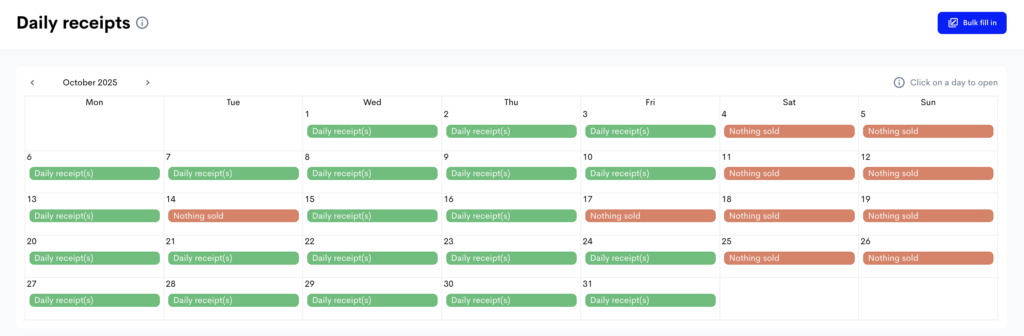
Do you sell to private individuals without issuing invoices? In that case, you can use daily receipts instead of creating an invoice for every order. You then record your total daily revenue. Do you also sell to businesses or international customers? In that case, you must issue invoices. You can therefore combine invoices and daily receipts.

Tip from a tax auditor
“When I go out to conduct an audit, I always have to check whether the daily receipts have been recorded up to the previous day.”
When should I record my daily receipts?
You should record your total daily income every day in a daily receipt log. You can do this on paper, but it’s much easier to keep track of it digitally. You’re not allowed to delete anything from your daily receipt log; that’s why you can’t use Excel.
Did you make a mistake? Then you must correct it by crossing it out, so that the correction is still visible.
Daily receipts must be recorded on the day you receive them as income. On your online store, you can easily use your account to record how much was received each day.
You can use different lines. There are no strict rules for the description. For example, you can use “daily revenue” or “web shop sales” as the description. Entrepreneurs often separate entries by payment method. For example, you could use “bank transfers” and “cash register”.
Do you sell a product that costs more than €500 including VAT per item? If so, that product must be listed on a separate line with a clear description.

How to record income from shipping costs?
The shipping costs you charge your customers are part of your revenue. You therefore charge VAT on these costs at the same VAT rate as the product you are shipping.
Keep this in mind when determining your shipping costs. Quotations from shipping services usually list prices excluding VAT. For example, if you pay €5 to ship a package, 21% VAT is added to that amount.
If you then charge your customer €5, you’re actually operating at a loss: you have to pay 21% (or €0.87) of that amount to the tax authorities.
How to record your online store’s expenses in your accounting?
Why should you record your expenses?
Every business expense you record correctly reduces your taxable profit. That means paying less income tax. So it’s in your best interest to keep track of your expenses.
What expenses can you claim?
You can claim all expenses necessary to keep your web shop running. Examples include:
- Purchase of products
- Packaging and shipping costs
- Hosting and software
- Marketing and advertising
- Phone and internet
- …
Make sure the expense is truly business-related and that you have an invoice for it.
👉 Want to make sure you don’t forget anything? Here’s a list of professional expenses to help you out!
What is a professional expense?
An expense is considered professional if you incur it for the purposes of your business. If you buy something that you also use for personal purposes, such as a laptop, you may only claim a portion of the cost. If you’re unsure, consult your accountant or visit the Tax Authority’s website.
What if my VAT number isn’t listed on an invoice?
If you purchase something from another business and want to claim a VAT refund, your VAT number must be listed on the invoice. Is it missing? Then request a corrected invoice. Without a valid invoice, you cannot claim the VAT refund. Are you not subject to VAT? In that case, it doesn’t matter much whether you received an official invoice or a receipt, and you can fully include this expense in your accounts.
Scanning and recognizing invoices with software
A convenient feature in Dexxter is the “scan-and-recognize software”. This means you no longer have to enter receipts manually. Just scan them, and the software does the rest. This speeds up your bookkeeping and reduces the risk of errors.
Tax returns for online stores
As a self-employed person with a web shop, you must file various tax returns each year.
VAT declaration
Make sure you keep your records up to date on a quarterly basis. Send out all invoices, record all expenses, and check that the VAT has been processed correctly. Then, file your VAT declaration no later than the 25th of the month following the quarter. You report how much you sold and how much VAT you received. Then you deduct the VAT on your business expenses from that amount. You pay the difference to the tax authorities.
Annual income tax return
In addition, you must file an annual personal income tax return in which you report your profits as a self-employed person. Whether you are self-employed in main or secondary occupation, you must report your income on your personal income tax return every year. You will receive a separate form where you list your revenue, expenses, and profits. If you have kept accurate records, filing this return is a quick process.
Intra-Community declaration (IC declaration)
Do you sell services or goods to customers subject to VAT in other EU countries? If so, you must also file an intra-Community declaration. In this declaration, you specify which businesses you have supplied and the amounts involved.
The OSS scheme for international sales within the EU
Do you sell more than €10,000 worth of goods annually to customers in other EU countries? If so, you’ll need to use the OSS scheme. This allows you to file all your foreign VAT declarations through a single portal, making it easier to comply with VAT rules in other countries.